
Add your campaign
Bring a product, offer, event, campaign brief or brand story into one focused workspace.
One brief to a week of on-brand social content
Turn one product brief into audience-ready copy, images and video. Review it once, then schedule a seven-day plan across 20+ social platforms without losing your brand voice.
Copy, images & video
Review once, publish a week
Supported social platforms
See BrandPurl in action
Watch one product brief become channel-ready copy, visuals, video and a seven-day publishing plan—without losing your brand voice.
Generate platform-ready captions, product visuals and multi-shot video from one focused brief.
Review once, then queue a full week across every connected channel at the right time.
Bring views, reach, likes and saves back into one clear performance dashboard.
How it works
Keep AI fast while retaining the review and brand control your team needs before anything goes live.
Bring a product, offer, event, campaign brief or brand story into one focused workspace.
Generate audience-ready copy, AI images and multi-shot videos — each adapted for the channel and campaign.
Choose your connected channels, approve the final version and publish — or queue a full 7-day plan with one click.
Audience-aware content intelligence
BrandPurl turns one product brief into content shaped for the people you want to reach—while keeping your facts, tone and visual identity consistent across every connected channel.
Lead with the benefit, proof and next step that matter to the people you want to reach.
Shape the hook, length and call to action for each connected social channel.
Keep product facts, tone and visual identity aligned from first draft to final publish.
Set the audience and campaign context once. BrandPurl adapts each post without losing what makes your brand recognisable.
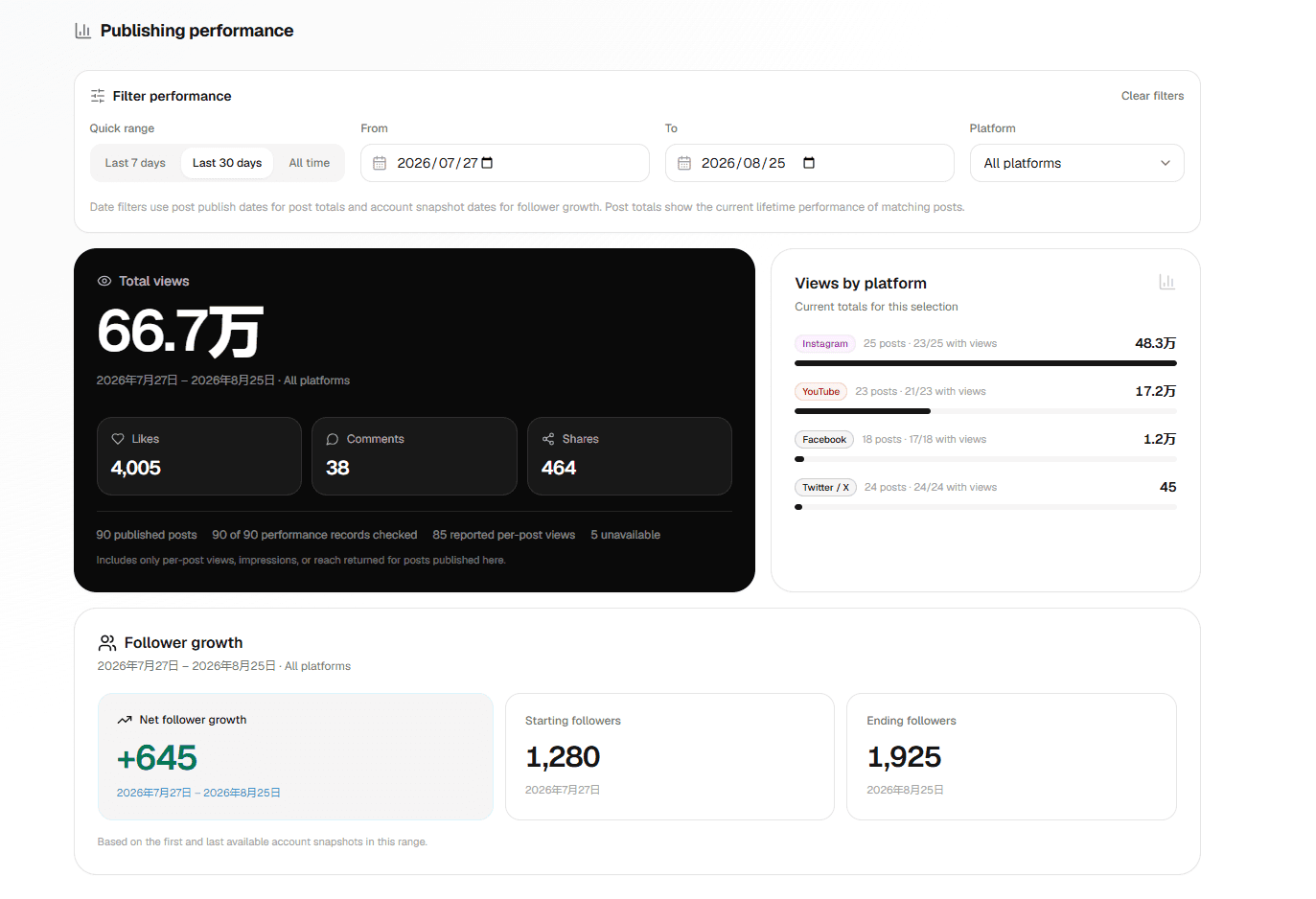
Example workspace data supplied for product demonstration. Results vary by account, content and market.
Pricing
Start with a 3-day trial and 30 credits. Switch between monthly and yearly billing on the full pricing page.
Included in every paid plan
200–2,000 included each month
Roll over while membership is active
At least 5% below official model prices
200 images · 200 credits · 1 brand
800 images · 700 credits · 4 brands
2,000 images · 2,000 credits · 10 brands
Tailored capacity and service
FAQ
No. Schedulers mostly help you queue posts. BrandPurl starts earlier: it reads the product, creates platform-specific content, remembers your brand, then helps you publish.
Yes. Every caption, hashtag set, image choice and traffic link can be reviewed before you send anything to a social channel.
BrandPurl uses the audience and campaign context you provide to make each message more relevant before it is adapted for each social channel.
To prevent failed campaigns. BrandPurl checks your connected publishing accounts first, then only enables the platforms that can actually receive the post.
No. Failed image or video generations return the reserved credits, and failed publishing channels are not charged. GPT copy is included, while successful images and video follow the allowance and credit rules shown on the pricing page.
Paid plans include a monthly image allowance. After that, each successful image uses 6 credits; video uses credits by model, resolution and seconds. Trial users have no plan image allowance, so their 30 welcome credits cover images and video. Unified credits roll over while membership remains active.
Create audience-ready copy, images and video, review the plan, then publish across every connected channel.